I've given this talk to enough engineering teams now that I figured I should just write it down. Every time I join a new team or onboard someone, it's the same conversation: people know they're "deploying to K8s" but have no mental model of what the system is actually doing under the hood.
This isn't the "hello world nginx" tutorial. This is the version where you understand the machine well enough that when something breaks at 2 AM, you know where to look.
Why K8s Exists
Run your application on 500 machines and suddenly hardware failures aren't edge cases anymore. Disks die, memory corrupts, NICs flake out. At Google's scale this was just daily life.
Two choices: buy better hardware (doesn't scale, expensive), or write software that treats failure as a normal operating condition. They built Borg, ran it internally for about a decade, then open-sourced the lessons as Kubernetes in 2014.
Don't try to prevent failures. Assume them.
Desired State vs. Current State
This is the one concept that makes everything else click. I always start here.
Traditional infra is imperative: you SSH in, run commands, hope nothing fails midway. K8s is declarative. You write down what you want the world to look like, and K8s figures out how to make it happen.
apiVersion: apps/v1
kind: Deployment
metadata:
  name: api-server
spec:
  replicas: 3
  selector:
    matchLabels:
      app: api-server
  template:
    metadata:
      labels:
        app: api-server
    spec:
      containers:
        - name: api
          image: ghcr.io/myorg/api-server:v1.4.2
          ports:
            - containerPort: 8080
          resources:
            requests:
              cpu: "250m"
              memory: "256Mi"
            limits:
              cpu: "500m"
              memory: "512Mi"
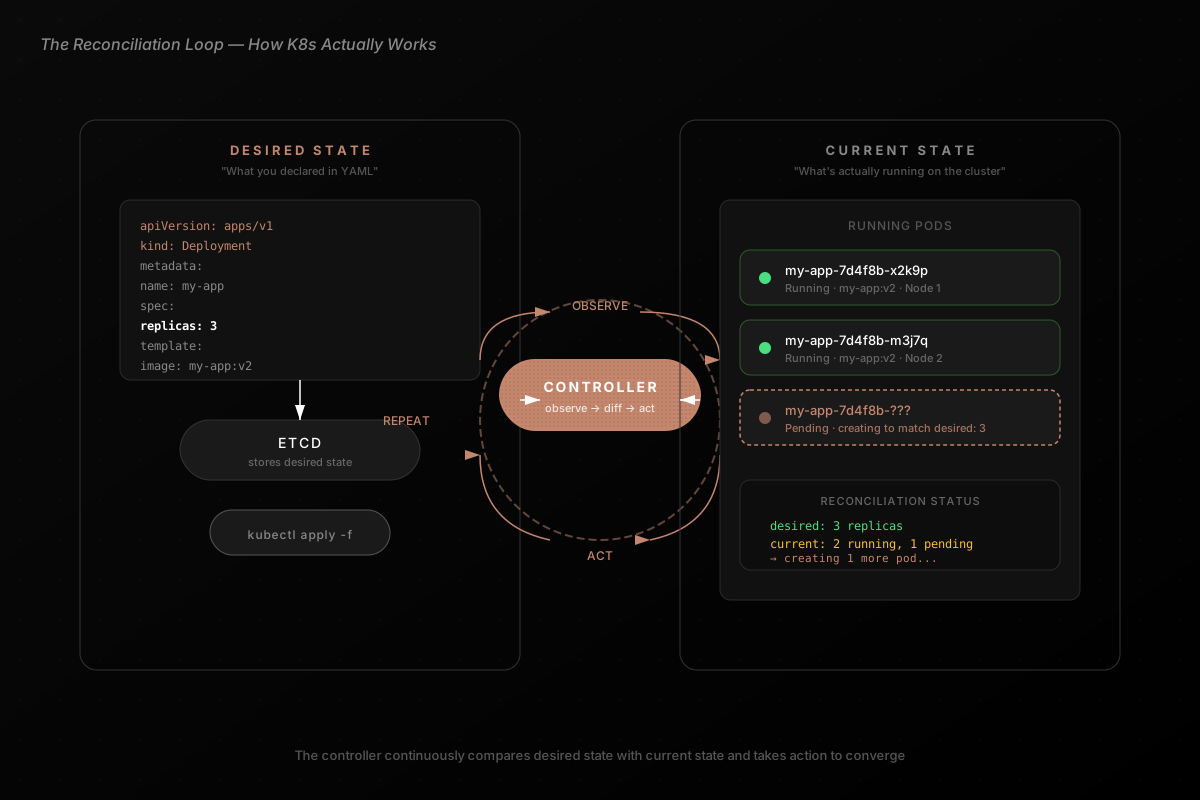
That's not a set of instructions. It's a contract: "I want 3 instances of api-server:v1.4.2, each with these resource bounds. You figure out the rest."
K8s reads this, looks at what's currently running, and takes action to close the gap. Pod crashed? "I want 3, I have 2," spins up a new one. Node went down? Same thing. This happens in a continuous loop (observe, diff, act, repeat) and it never stops.
That loop is called reconciliation, and it's the heartbeat of the entire system.
Inside the Cluster
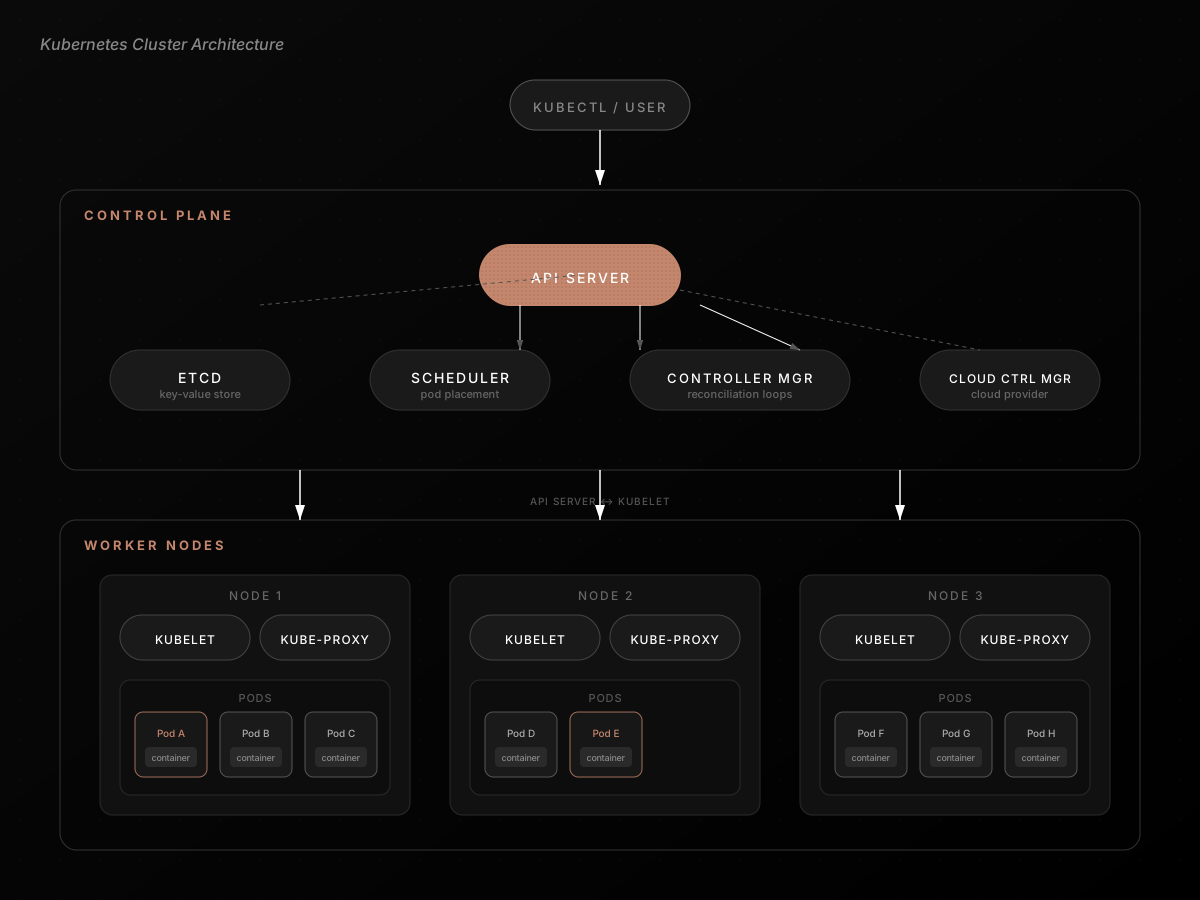
Two layers: the control plane (makes decisions) and worker nodes (run your stuff).
Control Plane
If you're on EKS/GKE/AKS, the cloud provider manages these for you. But you still need to understand them to debug anything non-trivial.
- API Server is the front door. Every
kubectlcommand, every internal component, every webhook, all of it goes through here. It validates requests, authenticates them, and writes the desired state to etcd. - etcd is a distributed key-value store that holds all cluster state. Every deployment, every pod spec, every configmap lives here. Lose etcd without backups and your cluster has amnesia.
- Scheduler watches for pods that don't have a node assigned yet, then picks one based on resource requests, affinity rules, taints, and tolerations. A matchmaker between pods and nodes.
- Controller Manager is where reconciliation actually happens. It's not one controller, it's dozens: one for deployments, one for replicasets, one for nodes, one for services. Each watches its own resource type and runs its own reconcile loop.
Worker Nodes
- Kubelet is the agent on every node. Gets pod specs from the API server, talks to the container runtime (containerd these days), and makes sure containers are running and healthy.
- Kube-proxy sets up networking rules so that traffic destined for a Service gets routed to the right pods, regardless of which node they're on.
The Building Blocks
Pods: The Atomic Unit
A pod is not a container. It's a wrapper around one or more containers that share the same network namespace and storage volumes. They all see localhost the same way.
Why not just run containers directly? Because some containers need to work together tightly. Your app and its sidecar proxy. A server and its log shipper. They need to share network and potentially share files. A pod gives them that shared context.
Pods are ephemeral by design. They get created, they run, they die. Don't get attached to a specific pod existing. K8s will replace them freely: when nodes go down, when deployments update, when autoscaling kicks in.
A pod goes through a defined lifecycle:
| Phase | Meaning |
|---|---|
| Pending | Waiting to be scheduled |
| Running | At least one container is up |
| Succeeded | All containers finished |
| Failed | Containers exited with errors |
| Unknown | Usually a node communication issue |
Init containers are worth knowing about. They run before your main containers start, in sequence. Need to wait for a database to be ready? Need to pull config from Vault? Need to run migrations? Init containers handle that setup.
Deployments: Managing the Fleet
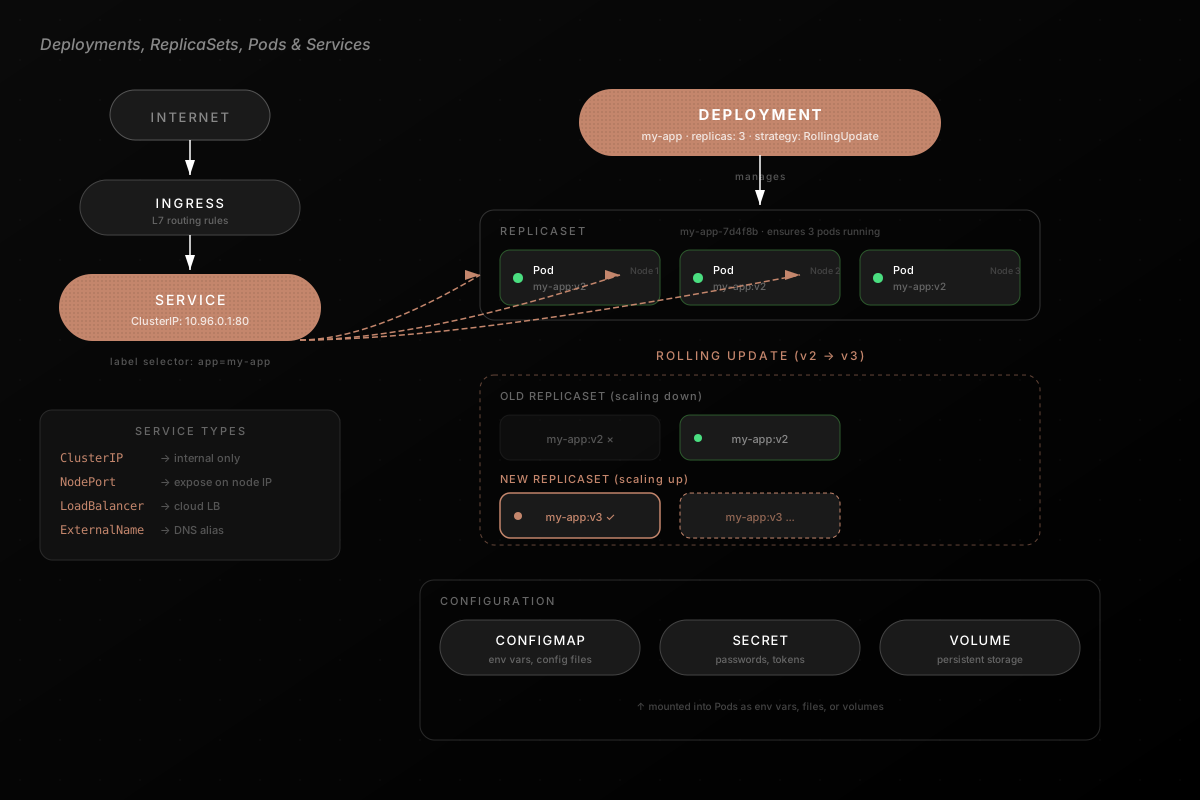
You almost never create pods directly. You create a Deployment, which manages a ReplicaSet, which manages your pods. The Deployment is where you declare how many replicas you want, what image to run, resource requests/limits, and your update strategy.
When you push a new image version, the Deployment creates a new ReplicaSet, gradually scales it up while scaling the old one down. That's a rolling update. If the new version starts crashing, you roll back with kubectl rollout undo and the old ReplicaSet takes over again.
Need more capacity? Change replicas: 3 to replicas: 10. Or set up a HorizontalPodAutoscaler and let K8s scale based on CPU/memory utilization. The system handles scheduling, networking, load balancing.
Services: Stable Networking for Ephemeral Pods
If pods are ephemeral and get new IPs every time they're recreated, how does anything talk to them? Services.
A Service provides a stable ClusterIP and DNS name, uses label selectors to find the right pods, and load balances across them:
apiVersion: v1
kind: Service
metadata:
  name: api-server-svc
spec:
  type: ClusterIP
  selector:
    app: api-server
  ports:
    - port: 80
      targetPort: 8080
Now anything in the cluster can hit api-server-svc:80. Pods come and go. The service endpoint stays the same.
Four types: ClusterIP (internal only, the default), NodePort (exposes on every node's IP), LoadBalancer (provisions a cloud LB), and ExternalName (DNS alias). For HTTP routing you'll typically add an Ingress on top for path-based routing and TLS termination.
ConfigMaps and Secrets
Don't bake configuration into your images. ConfigMaps store key-value pairs that pods consume as environment variables, command-line args, or mounted config files. Secrets are the same idea but for sensitive data: passwords, API keys, TLS certs.
The key benefit: you can update configuration without rebuilding your container images. Change a ConfigMap, restart the pods, they pick up new values.
Secrets are base64 encoded, not encrypted by default. If you care about security (you should), look into encrypting etcd at rest or using something like Sealed Secrets.
Jobs and CronJobs
Not everything is a long-running service. Migrations, ETL pipelines, batch processing: these run to completion and stop. That's what Jobs are for. You can run them as single tasks, with a fixed completion count, or with a work queue pattern.
CronJobs are Jobs on a schedule, triggered by cron expressions. Useful for nightly cleanups, periodic data syncs, report generation.
That's the Core
K8s is a control system built on one idea: declare what you want, and let the system converge toward it.
API server is the gateway. etcd is the memory. Controllers run the reconciliation loops. Pods are the unit of work. Services make networking stable. Everything else (Ingress, HPA, StatefulSets, CRDs) builds on these primitives.
Once you see it through that lens, the YAML stops feeling like ceremony and starts making sense. And when things break at 2 AM (they will), you'll know where to look.